BEGIN:VCALENDAR
VERSION:2.0
PRODID:-//ChamberMaster//Event Calendar 2.0//EN
METHOD:PUBLISH
X-PUBLISHED-TTL:P1H
REFRESH-INTERVAL:P1H
CALSCALE:GREGORIAN
BEGIN:VTIMEZONE
TZID:America/Phoenix
BEGIN:DAYLIGHT
DTSTART:20070311T020000
TZOFFSETFROM:-0700
TZOFFSETTO:-0700
TZNAME:(UTC-07:00) Arizona
END:DAYLIGHT
BEGIN:STANDARD
DTSTART:20071104T020000
TZOFFSETFROM:-0700
TZOFFSETTO:-0700
TZNAME:(UTC-07:00) Arizona
END:STANDARD
END:VTIMEZONE
BEGIN:VEVENT
DTSTART;TZID=America/Phoenix:20260427T090000
DTEND;TZID=America/Phoenix:20260427T160000
X-MICROSOFT-CDO-ALLDAYEVENT:FALSE
SUMMARY:SouthEast Valley Fingerprinting for WeSERV Members
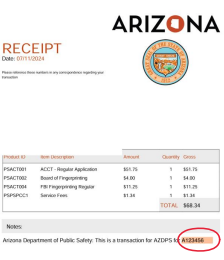
DESCRIPTION:The Arizona Department of Real Estate is enforcing updated \nFingerprint Clearance Card requirement as part of the license renewal process starting 1/1/2027.TO SCHEDULE YOUR FINGERPRINT APPOINTMENT WITH WeSERV\, FOLLOW THESE 7 STEPS:Step 1: Click on the REGISTER button on the right-hand side of your screen and reserve an appointment time at your local WeSERV office. (Offered in the SEV and WV office)Step 2: Create Your AZDPS (Arizona Department of Public Safety) Account and complete the application.YOU MUST COMPLETE THE AZDPS CLEARANCE CARD APPLICATION TO BE FINGERPRINTED!Navigate to the Arizona DPS Public Services Portal: https://psp.azdps.gov/Click on the "Sign up" link\, usually located in the top right corner of the page.Select "Fingerprint Clearance Card" from the available options.Choose "Individual."You will be guided through a 4-step process to submit your personal information.Step 3: You will need to access the email listed on your AZDPS application and verify your account. Click the link in the email to verify your account.Step 4: Apply for the Non-IVP Fingerprint Clearance CardOnce your account is created and verified\, log in to the DPS Public Services Portal: https://psp.azdps.gov/account/login From the main dashboard\, select "Fingerprint Clearance Card".Choose "Apply for a Card / Request a Replacement" and click "Continue".You will be prompted to select the type of card. Choose "Non-IVP".For the "Reason for Applying\," select "AZ Department of Real Estate   Licensure ARS  32-2108.01".Complete the application with your personal information.Step 5: Pay the ~$68 AZDPS Application fee online with a credit or debit card.Step 6: Print your AZDPS receipt and bring it to your Fingerprinting appointment. Your fingerprinting appointment may be rescheduled\, and services will not be provided if you DO NOT have your receipt.Step 7: Pay the $40 fingerprinting service fee to Aloha Fingerprints when you arrive at your appointment. Cash\, Tap to Pay\, and Major Credit/Debit Cards accepted.
X-ALT-DESC;FMTTYPE=text/html:<!DOCTYPE html><html><head><title></title></head><body aria-disabled="false"><pre fr-original-style="color: rgb(0\, 0\, 0)\; font-family: Arial\; font-size: medium\; font-style: normal\; font-variant-ligatures: normal\; font-variant-caps: normal\; font-weight: 400\; letter-spacing: normal\; orphans: 2\; text-align: center\; text-indent: 0px\; text-transform: none\; widows: 2\; word-spacing: 0px\; -webkit-text-stroke-width: 0px\; white-space: normal\; text-decoration-thickness: initial\; text-decoration-style: initial\; text-decoration-color: initial\;" style="color: rgb(0\, 0\, 0)\; font-family: Arial\; font-size: medium\; font-style: normal\; font-variant-ligatures: normal\; font-variant-caps: normal\; font-weight: 400\; letter-spacing: normal\; orphans: 2\; text-align: center\; text-indent: 0px\; text-transform: none\; widows: 2\; word-spacing: 0px\; -webkit-text-stroke-width: 0px\; white-space: normal\; text-decoration-thickness: initial\; text-decoration-style: initial\; text-decoration-color: initial\; overflow-wrap: break-word\; overflow: visible\;"><span style="font-family: Georgia\, serif\; font-size: 12px\;"><strong fr-original-style="" style="font-weight: 700\;">The Arizona Department of Real Estate is enforcing updated </strong></span><span style="font-size: 12px\;">\n<span style="font-family: Georgia\, serif\;"><strong fr-original-style="" style="font-weight: 700\;">Fingerprint Clearance </strong></span></span><span style="font-family: Georgia\, serif\; font-size: 12px\;"><strong fr-original-style="" style="font-weight: 700\;">Card requirement as part of the license renewal process starting 1/1/2027.</strong></span></pre><pre fr-original-style="color: rgb(0\, 0\, 0)\; font-family: Arial\; font-size: medium\; font-style: normal\; font-variant-ligatures: normal\; font-variant-caps: normal\; font-weight: 400\; letter-spacing: normal\; orphans: 2\; text-align: center\; text-indent: 0px\; text-transform: none\; widows: 2\; word-spacing: 0px\; -webkit-text-stroke-width: 0px\; white-space: normal\; text-decoration-thickness: initial\; text-decoration-style: initial\; text-decoration-color: initial\;" style="color: rgb(0\, 0\, 0)\; font-family: Arial\; font-size: medium\; font-style: normal\; font-variant-ligatures: normal\; font-variant-caps: normal\; font-weight: 400\; letter-spacing: normal\; orphans: 2\; text-align: center\; text-indent: 0px\; text-transform: none\; widows: 2\; word-spacing: 0px\; -webkit-text-stroke-width: 0px\; white-space: normal\; text-decoration-thickness: initial\; text-decoration-style: initial\; text-decoration-color: initial\; overflow-wrap: break-word\; overflow: visible\;"><strong fr-original-style="" style="font-weight: 700\;"><span style="font-family: Georgia\, serif\; color: rgb(184\, 49\, 47)\; font-size: 12px\;">TO SCHEDULE YOUR FINGERPRINT APPOINTMENT </span></strong><span style="font-size: 12px\;"><strong fr-original-style="" style="font-weight: 700\;"><span style="font-family: Georgia\, serif\; color: rgb(184\, 49\, 47)\;">WITH WeSERV\, FOLLOW THESE</span></strong><span style="font-family: Georgia\, serif\; color: rgb(184\, 49\, 47)\;"><strong fr-original-style="" style="font-weight: 700\;"> 7</strong></span><strong fr-original-style="" style="font-weight: 700\;"><span style="font-family: Georgia\, serif\; color: rgb(184\, 49\, 47)\;"> STEPS:</span></strong></span></pre><p><span style="font-size: 14px\;"><span style="font-family: Georgia\,serif\;"><strong fr-original-style="" style="font-weight: 700\;">Step 1:</strong> Click on the <strong fr-original-style="" style="font-weight: 700\;">REGISTER&nbsp\;</strong>button on the right-hand side of your screen and reserve an appointment time at your local WeSERV office. (Offered in the SEV and WV office)</span></span></p><p><span style="font-size: 14px\;"><span style="font-family: Georgia\,serif\;"><strong fr-original-style="" style="font-weight: 700\;">Step 2:&nbsp\;</strong>Create Your AZDPS (Arizona Department of Public Safety) Account and complete the application.</span></span></p><pre fr-original-style="color: rgb(0\, 0\, 0)\; font-family: Arial\; font-size: medium\; font-style: normal\; font-variant-ligatures: normal\; font-variant-caps: normal\; font-weight: 400\; letter-spacing: normal\; orphans: 2\; text-align: center\; text-indent: 0px\; text-transform: none\; widows: 2\; word-spacing: 0px\; -webkit-text-stroke-width: 0px\; white-space: normal\; text-decoration-thickness: initial\; text-decoration-style: initial\; text-decoration-color: initial\;" style="color: rgb(0\, 0\, 0)\; font-family: Arial\; font-size: medium\; font-style: normal\; font-variant-ligatures: normal\; font-variant-caps: normal\; font-weight: 400\; letter-spacing: normal\; orphans: 2\; text-align: center\; text-indent: 0px\; text-transform: none\; widows: 2\; word-spacing: 0px\; -webkit-text-stroke-width: 0px\; white-space: normal\; text-decoration-thickness: initial\; text-decoration-style: initial\; text-decoration-color: initial\; overflow-wrap: break-word\; overflow: visible\;"><span style="font-size: 12px\;"><span style="font-family: Georgia\, serif\;"><span style="color: rgb(184\, 49\, 47)\; font-style: normal\; font-variant-ligatures: normal\; font-variant-caps: normal\; font-weight: 400\; letter-spacing: normal\; orphans: 2\; text-align: start\; text-indent: 0px\; text-transform: none\; widows: 2\; word-spacing: 0px\; -webkit-text-stroke-width: 0px\; white-space: normal\; text-decoration-thickness: initial\; text-decoration-style: initial\; text-decoration-color: initial\; float: none\; display: inline !important\;"><strong fr-original-style="font-weight: 700\;" style="font-weight: 700\;">YOU MUST COMPLETE THE AZDPS CLEARANCE CARD </strong></span></span><span style="font-family: Georgia\, serif\;"><span style="color: rgb(184\, 49\, 47)\; font-style: normal\; font-variant-ligatures: normal\; font-variant-caps: normal\; font-weight: 400\; letter-spacing: normal\; orphans: 2\; text-align: start\; text-indent: 0px\; text-transform: none\; widows: 2\; word-spacing: 0px\; -webkit-text-stroke-width: 0px\; white-space: normal\; text-decoration-thickness: initial\; text-decoration-style: initial\; text-decoration-color: initial\; float: none\; display: inline !important\;"><strong fr-original-style="font-weight: 700\;" style="font-weight: 700\;">APPLICATION TO BE FINGERPRINTED!</strong></span></span></span></pre><ul fr-original-style="text-align: center\;" style="text-align: center\; list-style-position: inside\;"><li style="font-family: Georgia\, serif\; font-size: 14px\; text-align: left\;">Navigate to the Arizona DPS Public Services Portal: <a fr-original-style="" href="https://psp.azdps.gov/" style="user-select: auto\;">https://psp.azdps.gov/</a></li><li style="font-family: Georgia\, serif\; font-size: 14px\; text-align: left\;">Click on the &quot\;Sign up&quot\; link\, usually located in the top right corner of the page.</li><li style="font-family: Georgia\, serif\; font-size: 14px\; text-align: left\;">Select &quot\;Fingerprint Clearance Card&quot\; from the available options.</li><li style="font-family: Georgia\, serif\; font-size: 14px\; text-align: left\;">Choose &quot\;Individual.&quot\;</li><li style="font-family: Georgia\, serif\; font-size: 14px\; text-align: left\;">You will be guided through a 4-step process to submit your personal information.</li></ul><p><span style="font-size: 14px\;"><span style="font-family: Georgia\,serif\;"><strong fr-original-style="" style="font-weight: 700\;"><span style="font-family: Georgia\,serif\;"><strong fr-original-style="" style="font-weight: 700\;">Step 3:&nbsp\;</strong></span></strong><span style="font-family: Georgia\,serif\;">You will need to access the email listed on your AZDPS application and verify your account. Click the link in the email to verify your account.</span></span></span></p><p><span style="font-size: 14px\;"><span style="font-family: Georgia\,serif\;"><strong fr-original-style="" style="font-weight: 700\;">Step 4:&nbsp\;</strong>Apply for the Non-IVP Fingerprint Clearance Card</span></span></p><ul fr-original-style="" style="list-style-position: inside\;"><li style="font-family: Georgia\, serif\; font-size: 14px\;">Once your account is created and verified\, log in to the DPS Public Services Portal: <a fr-original-style="" href="https://psp.azdps.gov/account/login" style="user-select: auto\;">https://psp.azdps.gov/account/login</a>&nbsp\;</li><li style="font-family: Georgia\, serif\; font-size: 14px\;">From the main dashboard\, select <strong fr-original-style="" style="font-weight: 700\;">&quot\;</strong><strong fr-original-style="" style="font-weight: 700\;">Fingerprint Clearance Car</strong><strong fr-original-style="" style="font-weight: 700\;">d</strong><strong fr-original-style="" style="font-weight: 700\;">&quot\;</strong>.</li><li style="font-family: Georgia\, serif\; font-size: 14px\;">Choose &quot\;<strong fr-original-style="" style="font-weight: 700\;">Apply for a Card / Request a Replacement&quot\;&nbsp\;</strong>and click <strong fr-original-style="" style="font-weight: 700\;">&quot\;Continue</strong>&quot\;.</li><li style="font-family: Georgia\, serif\; font-size: 14px\;">You will be prompted to select the type of card. Choose<strong fr-original-style="" style="font-weight: 700\;">&nbsp\;&quot\;Non-IVP&quot\;</strong>.</li><li style="font-family: Georgia\, serif\; font-size: 14px\;">For the<strong fr-original-style="" style="font-weight: 700\;">&nbsp\;&quot\;Reason for Applying\,&quot\;</strong> select <strong fr-original-style="" style="font-weight: 700\;">&quot\;AZ Department of Real Estate &ndash\; Licensure ARS &sect\;32-2108.01&quot\;</strong>.</li><li style="font-family: Georgia\, serif\; font-size: 14px\;">Complete the application with your personal information.</li></ul><p><span style="font-size: 14px\;"><span style="font-family: Georgia\, serif\;"><strong fr-original-style="" style="font-weight: 700\;">Step 5:</strong> Pay the ~$68 AZDPS Application fee online with a credit or debit card.</span></span></p><p><span style="font-size: 14px\;"><span style="font-family: Georgia\,serif\;"><strong fr-original-style="" style="font-weight: 700\;">Step 6:&nbsp\;</strong>Print your AZDPS receipt and bring it to your Fingerprinting appointment.<strong fr-original-style="" style="font-weight: 700\;"><span style="color: rgb(184\, 49\, 47)\;">&nbsp\;Your fingerprinting appointment may be rescheduled\, and services will not be provided if you DO NOT have your receipt.</span></strong></span></span></p><p><span style="font-size: 14px\;"><span style="font-family: Georgia\,serif\;"><img src="https://res.cloudinary.com/micronetonline/image/upload/v1769643996/tenants/b8fa1de5-5070-4193-8577-7272e7a9a7c9/1db5b789a807444f9be0de5f1274d71c/1769643995893.png" style="width: 359px\; display: block\; vertical-align: top\; margin: 5px auto 5px 0px\; text-align: left\; height: 416.44px\; position: relative\; max-width: 100%\; cursor: pointer\; padding: 0px 1px\;" width="359" height="416.44" fr-original-style="width: 359px\; display: block\; vertical-align: top\; margin: 5px auto 5px 0px\; text-align: left\; height: 416.44px\;" fr-original-class="fr-draggable"></span></span></p><p><span style="font-family: Georgia\, serif\; font-size: 14px\;"><strong fr-original-style="" style="font-weight: 700\;">Step 7:</strong> Pay the $40 fingerprinting service fee to Aloha Fingerprints when you arrive at your appointment. Cash\, Tap to Pay\, and Major Credit/Debit Cards accepted.</span></p></body></html>
LOCATION:1733 E Northrop Blvd Chandler
UID:e.4073.1429340
SEQUENCE:3
DTSTAMP:20260405T073224Z
URL:https://weservwestandsoutheastrealtorsofthevalley.growthzoneapp.com/cochise-county-calendar/Details/southeast-valley-fingerprinting-for-weserv-members-1690809?sourceTypeId=Hub
END:VEVENT
END:VCALENDAR